Showing posts with label ppp. Show all posts

Default routing with PPP

Creating a default route within a standard PPP link is not complex, but it is not obvious either. We are not running an IGP, so we cannot redistribute a static default route, nor can we do, say, "default-information originate". However, it is just a one-line command, you just need to know what you are looking for!

We start with a couple of routers.
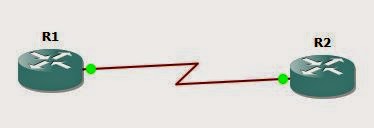
PPP default routing

The goal will be for R1 to have a default route in it's routing table, pointing to R2. We start with a basic config:
R1(config)#int s3/0
R1(config-if)#no shut
R1(config-if)#encapsulation ppp
R1(config-if)#ip add 10.1.1.1 255.255.255.0

R2(config)#int s3/0
R2(config-if)#encap ppp
R2(config-if)#ip add 20.1.1.1 255.255.255.0
R2(config-if)#no shut
Now we need R1 to have a default route. We do not have an IGP running between the two, so we cannot do any redistribution or anything like that. We need to look at R1 and see what options we have.
R1(config-if)#ppp ?
  accm              Set initial Async Control Character Map
  accounting        Set PPP network accounting method
  acfc              Options for HDLC Address & Control Field Compression
  authentication    Set PPP link authentication method
  authorization     Set PPP network authorization method
  bcp               Set BCP negotiation options
  bridge            Enable PPP bridge translation
  caller            Caller option when no CLID is available
  chap              Set CHAP authentication parameters
  direction         Override default PPP direction
  disconnect-cause  Set disconnect-cause code
  dnis              Authentication via DNIS before LCP
  eap               Set EAP authentication parameters
  encrypt           Enable PPP encryption
  ipcp              Set IPCP negotiation options
  iphc              Set IPCP Header Compression control options
  ipv6cp            Set IPV6CP negotiation options
  lcp               PPP LCP configuration
  link              Set miscellaneous link parameters
  loopback          PPP loopback options
  max-bad-auth      Allow multiple authentication failures
  max-configure     Number of conf-reqs sent before assuming peer is unable to

R1(config-if)#
We have one called "ipcp". This stands for Internet Protocol Control Protocol. IPCP looks after IP addressing on a PPP link. Within the options for "ppp ipcp" we have:
R1(config-if)#ppp ipcp ?
  accept-address      Accept any non zero IP address from our peer
  address             Additional ipcp address options
  dns                 Specify DNS negotiation options
  header-compression  IPCP header compression option
  ignore-map          Ignore dialer map when negotiating peer IP address
  mask                Specify subnet mask negotiation options
  no-renegotiation    Do not allow client to renegotiate IPCP
  predictive          Predict peers IPCP requests/replies
  route               Install default route thru negotiated peer IP address
  username            Configure how usernames are handled
  wins                Specify WINS negotiation options

R1(config-if)#
So, ppp ipcp route looks like a winner!
R1(config-if)#ppp ipcp route ?
  default  Install default route thru negotiated peer IP address

R1(config-if)#
So the complete command will be:
R1(config-if)#ppp ipcp route default
Let's see what this gets us!
R1(config-if)#do sh ip route | b Gateway
Gateway of last resort is 20.1.1.1 to network 0.0.0.0

S*    0.0.0.0/0 [1/0] via 20.1.1.1
      10.0.0.0/8 is variably subnetted, 2 subnets, 2 masks
C        10.1.1.0/24 is directly connected, Serial3/0
L        10.1.1.1/32 is directly connected, Serial3/0
      20.0.0.0/32 is subnetted, 1 subnets
C        20.1.1.1 is directly connected, Serial3/0
R1(config-if)#
Let's add a loopback interface to R2 and check that we have connectivity:
R2(config-if)#int lo0
R2(config-if)#ip add 2.2.2.2 255.255.255.255
R2(config-if)#

R1(config-if)#do ping 2.2.2.2
Type escape sequence to abort.
Sending 5, 100-byte ICMP Echos to 2.2.2.2, timeout is 2 seconds:
!!!!!
Success rate is 100 percent (5/5), round-trip min/avg/max = 92/113/148 ms
R1(config-if)#
Nice. A little one-liner and we have a default route between two disparate networks.

The BIG lab - Part 2 - PPP

Following on from part one where we set up trunking, vtp, port aggregation and load balancing, we are going to move to the other side of our topology now and set up PPP between R1 and R2.


iou netmap

This will cover item 1.70 if the CCIE exam list (Implement High-Level Data Link Control (HDLC) and PPP). Now thankfully as HDLC is the default within PPP for Cisco devices then the process is pretty straight forward.

Remember from the first post when I said that the topology will probably change throughout this lab, well already its going to change, by adding a second link between R1 and R2 so we can check out multi-link PPP. Considering the topology has already changed and it's only part 2 of this series I reckon that the topology will be far different as we near the end!

The topology now looks like this:


iou netmap

And the netmap now looks like this

1:0/0 2:0/0
1:0/1 2:0/1
2:0/2 3:0/0
2:0/3 4:0/0
4:0/1 5:0/0
5:0/1 6:0/0
6:0/1 7:0/1
4:0/2 8:0/0
5:0/2 9:0/0
8:0/1 9:0/1
8:0/2 10:1/0
10:0/1 11:1/1
11:0/0 12:0/0
11:0/1 12:0/1
11:0/2 13:0/2
13:0/0 14:0/0
13:0/1 14:0/1
12:0/2 14:0/2

So lets get started with PPP.

Basic PPP configuration

The basic set up of PPP is three commands. Firstly we create a username and password on one router for the second router (i.e. a user called R2 will be created on R1 and vice versa). Secondly we set the encapsulation, and thirdly we set the authentication type.


PPP setup cisco router

There is very little difference on the other side of the link:


ppp setup Cisco router

And (once we remember to do a "no shut"), we can see that the link is up:


ppp setup cisco router

Now let's see how to throw another link into the mix.

Multi-link PPP

When we create a multi-link connection we start by removing the ip addresses from the individual serial links, and assign the interface to the multilink group instead:


multilink ppp cisco router

We do the same on R2 and check the multilink interface is up, and that we can ping back to R1:


multilink ppp cisco router

We can now start to see the benefit of multi-link PPP, in that it balances traffic by fragmenting each frame and sending these fragments out over different links.

I cleared the counters on both the serial interfaces in R2 and on the multilink interface, then sent a ping with a repeat of 100. Now if we look at the interface statistics, starting with the multilink interface:


multilink interfaces ppp

Firstly we can see that the bandwidth is 3088 Kbit/sec, and we can see that we have 11011 bytes input and 12707 bytes output. Now lets look at s0/0:


ppp multilink

The bandwidth is the standard 1544 for a serial link and we have 6376 bytes going in and out, and if we have a look at s0/1:

ppp multilink

We can see here that the bandwidth is also 1544 (which accounts for the 3088 bandwidth we saw for the multilink interface), and they byte count is 6651 (in and out). 6376 + 6651 = 13027, which is close to the byte count seen on the multilink interface (it's not exact as there was probably some packets sent in between clearing the counters and doing the "sh int" commands).

PPP Link fragmentation and interleaving (LFI)

So what else can we do with PPP and PPP Multi-link? Well we can implement compression and play around with the link fragmentation and interleaving (LFI). 

LFI

LFI is a form of QoS that prevents small, delay-sensitive packets from having to wait longer for larger packets to be completely serialized out of an interface. LFI fragments the larger packets and send the smaller packet after just a portion of the larger packet. This only takes two commands, and these are:


multilink interleaving fragment

The first command will interleave the packets (as specified above), the second command sets the fragment delay to 10ms.

Compression we'll leave until nearer the end of the series when we'll look at optimizing our network, but for the last part of this post we'll look at AAA authentication.

AAA for PPP

We can setup AAA authentication for PPP as seen below:


We start with the aaa new-model command (which sets up new access-control commands and functions) , we then set the command "aaa authentication login default line" which will then accept the line password for authentication. We then set the login to be radius with local case as a fallback with the command "aaa authentication ppp default group radius local-case" and we should also create the local usernames as we did earlier as the fallback mechanism. We then set the radius host, and specify the key to be used, and lastly we set the authentication for chap to use the default authentication list (radius then local-case).

And that's PPP, PPP Multilink, interleaving and AAA for PPP covered.

So what's next? Well, I'd like to do the tunnel between R7 and R9, but that will require getting frame-relay, RIP and EIGRP all set up, so instead, let's not run before we can walk, and we'll do OSPF instead.

So next up in part 3 we'll look at OSPF, concentrating on locking our updates down to loopback addresses, advertising these loopback addresses, and join our OSPF instances to R1 - not just because it would be lonely out there on the edge of our topology, but also because at the end of our series we'll need to test end to end connectivity.