Showing posts with label BGP. Show all posts

UNetLab topologies now available.

It seems that (and I am very thankful for this) UNetLab is making strong gains in popularity, as it should.

Whilst I do get the occasional email asking for setup help with GNS3 (which I am more than happy to do), I get far more emails asking when the book topologies will be available for UNetLab.

So, now that things have quietened down a bit, I have had time to do this.

On the relevant pages (above, under the Books menu) there are links for the files for the main topologies for all the books.

They are also here, to make it easier.

To import them you just need to create a folder called 802101 (you don't really have to have a folder, but it makes it neater):


Once thats done, go into the folder and then import an external object. Make sure its the whole zip file!


Then you should get a nice bunch of new labs:


The download links are below.

UNetLab Topology download links:

BGP for Cisco Networks
MPLS for Cisco Networks
VPNs and NAT for Cisco Networks

BGPv2

I read a while ago, that some authors don't read their reviews. I am a bit more inquisitive, and can take criticism, so I do read reviews.

I have had some really positive feedback for both volumes, BGP has three and a half stars, MPLS is running at 5 stars (but there are less reviews).

Many people have come to me directly, saying that they have really enjoyed my books, and the majority of reviews also reflect this. However, there are a few people who have raised criticism with it. Justifiably so, as well.

Let's backtrack a bit, so you can get a feel for the process and thought process behind the first volume.

Originally I had only planned to release it on Kindle - it's an easy process, no overheads, and I can publish cheaply, because my costs are low - again this goes back to the whole issue of books being far too expensive. I am not out to get rich from writing, so I price my books at an affordable level.

It took about three months to write, and I lived and breathed it. I did read through it, and everything made sense. Here we probably have the crux of the issues. Everything made sense to me, but at this stage I didn't really have anyone to read it over, who knew the subject matter. So, whilst everything made sense to me, I think that the complete immersion in it meant that I was not subjective about it, and quality control slipped.

Anyway, a guy at work said that releasing in print was easy, through Createspace, so I went ahead and did it. Taking the kindle version, and changing the layout.

I did not expect it to be so popular. Originally, I said to my wife, if a couple of people tell me they found it useful, then it will all be worth it. It's sold really well. Far better than I had ever expected.

The process has become better and easier. Things changed with the MPLS volume. Instead of writing it in Pages, then moving to Word, I wrote directly in Word. Pictures were inserted, rather than dropped onto the page, and formatting was changed. I used OnmiGraffle to create the diagrams, instead of using screenshots from GNS3. Things were easier, and it looked "cleaner" and more polished.

The next volume, VPNs and NAT, followed the changed approach, and shares this "cleanness". Code is indented, the pictures look better and sharper.

I read the reviews. Many of them were positive. Here are some of the positive ones:

BGP for Cisco Networks feedback


BGP for Cisco Networks feedback

BGP for Cisco Networks feedback

BGP for Cisco Networks feedback

BGP for Cisco Networks feedback

Others were not:

BGP for Cisco Networks feedback

I tried to connect with Micah on Linked it, but he wasn't having any of it. I actually agreed with his review, yes I did have a typo for the private AS numbers, and no the book didn't have any outside editing. It fell far short of the other volumes.

BGP for Cisco Networks feedback

As for Jazzheds, well, yes I do agree that my book contained way too many grammatical errors, but if you are going to criticise someone else's grammar, it would be wise to criticise it without grammatical error yourself. Nonetheless, there were too many grammatical errors in the BGP volume. Again, this comes from the immersion, which means that subjectiveness was also lost. 

BGP for Cisco Networks feedback

Lastly, we get to Ahmed's feedback. Well, there are plenty of engineers who have been on the field for many many years, without gaining certification, and they are perfectly capable of doing their job, and teaching it to others. Certifications do not equal ability. They equal knowledge on a particular day.

Anyway, I am not bitching here (well... may be a bit....), but I have actually taken the feedback on-board.

I have republished my book BGP. I have gone right through it, the grammatical errors have gone, the diagrams have been re-done, the troubleshooting section has been re-done, so that the majority of it is just one topology. The formatting matches the other volumes. The print version is done and I will re-do the kindle version to match it. The beauty of Kindle is that I can get Amazon to update peoples copies.

Where does that leave people who bought the print version?

Here's the issue, I now feel the need to make some kind of reparation to the people who bought the BGP book. It fell far short of what I now consider the be the level I publish my books at. I hope you understand that this is a learning curve for me, and that the process is continually evolving. To those that have enjoyed it, I thank you. To those who didn't enjoy it, because of the issues highlighted above, I apologise.

I have been thinking how to make things better. I am a firm believer in the concept that if you do something wrong, then you should fix it. Whilst I can't send a new copy to everyone, I can still do something for you, and that is to give you my time.

Here's where you come in. If you bought the BGP book, and were less than happy with it, then let me know. Either send me a picture of you and the book (I like to know who my readers are, and I am building up nice relationships with some of them), or send me the receipt for the book. My email address is in the book.

In return, I will work on something just for you guys. I am not sure what, but in the comments section below let me know what you would like to read about. I can't do an individual book per person, that would take years, but if the ideas are good, then those who get in contact with me will get it, and it'll be a PDF, minimum of say 150-200 pages.

My initial thoughts are maybe I do some practice labs, but please let me know your thoughts below. What would you guys like to get? 

Whatever is decided upon will be done after the multicast and QoS volume, and is really only for the people who bought the BGP book. I am happy to extend this to anyone who has bought any of my books. It may end up personalised in someway, maybe a watermark, or some identifying text somewhere, as this is for the people who have supported me by buying the books.

I hope this makes up for what was lacking with the BGP book. 

Stuart. 

BGP for Cisco Networks for IOU!

Hot on the heels of releasing the topology for BGP for Cisco Networks for GNS3 1.0 Beta comes the topology for IOU-WEB.

Firstly I must say that I did not create this, not that this is any form of get-out-clause, but because all the thanks go to a great guy, who has done a GREAT job on it, it really does look fantastic!

I mean check this out, how good does this look?


That's one lovely diagram there.  I wish my Visio diagrams looked that good!

Along with the IOU topology is a Visio drawing of the topology.
I have updated the downloads section for the book with the links to the files. Now it's just waiting for ViRL to be released and we have every platform covered!

I am very thankful to the guy who has done this, and he's offered to do the IOU typologies for the MPLS volume as well. If they look anything like the ones that he's done for the BGP book then they will be great as well!

Either way I will be sending him a free copy of the MPLS book when it's published. I have just completed a couple of chapters this week, and this weekend should finish another, then it's just one last chapter to do, which is all planned out, then ready for proofing and publishing!
BGP book topology updated for GNS3 1.0! MPLS book coming soon!

BGP book topology updated for GNS3 1.0! MPLS book coming soon!

BGP for Cisco Networks & GNS3 1.0

I had a request hit my inbox last month for the topology for my book "BGP for Cisco Networks" to be updated for GNS3 1.0.

I must confess that with trying to finish off "MPLS for Cisco Networks", which is looking great and should be out soon(ish), I didn't do this very quickly.

But thanks to a great guy called Dan over at GNS3 and his nifty python based converter I have been able to do this in under half an hour.

So thanks Dan!

If you are currently using GNS3 1.0 and want to load up the topology, its available in the Downloads section.


MPLS for Cisco Networks

The MPLS book is taking a lot longer than the first, for a number of reasons.

I had a pretty good grounding in BGP when I started, but not so much with MPLS, and MPLS feels like such a bigger subject, the book is certainly longer if that's anything to go by!

I have learnt some things from the first book, mainly due to the comments made by my readers, so there will be more diagrams, more configurations, and hopefully a sense of being part of the book, rather than just a reader... That last bit should make more sense when you read it.

I am just finishing off a couple of bits; VPLS, OTV, IPv6 for VRF-Lite, and need to do the troubleshooting chapter - which is all planned out, and then its a matter of proofing, sending over to my technical ed, and then publishing!

Again topologies will be available in GNS3 0.8 first, with GNS31.0 and ViRL (whenever that eventually turns up) at a later stage.

BGP Load Balancing with Cisco IOS and Junos

Today we are going to do some BGP load balancing between a Cisco router and a Juniper router.

We have a very simple topology:


The Juniper router (JUNOS1) is called NewYork and the Cisco router (R1) is called London.

We have two connections between them 1.1.1.1/24 on the Juniper to 1.1.1.2/24 on the Cisco, and 2.2.2.1 on the Juniper to 2.2.2.2 on the Cisco. We will be using AS 65000 for the BGP AS.

For the Juniper basic configuration please check out these two posts:

Juniper router emulation in GNS3
Basic Juniper Router commands

What is BGP Load Balancing?

Load balancing can use two or more connections to send data to the same destination. Load balancing in BGP requires that we enable multi-pathing, so that the router knows that it can use more than one path at a time.

We will start with the basic BGP configuration and from there advertise a loopback network on each side, then we will set up multi-pathing.

Cisco IOS BGP setup

I won't explain all the Cisco steps as they shouldn't be anything new - but there are links to my book here. Shameless plug I know!
London(config)#router bgp 65000
London(config-router)#neighbor 1.1.1.1 remote-as 65000
London(config-router)#neighbor 2.2.2.1 remote-as 65000
London(config-router)#exit
London(config)#exit
London#

Juniper JunOS BGP setup

For the JunOS set up we will create the BGP AS under routing options, and then create a group called Cisco to add the two peerings to the Cisco router to, setting the AS number to match our own, and the type to be internal (iBGP).
root@NewYork> configure
Entering configuration mode

[edit]
root@NewYork# set routing-options autonomous-system 65000
root@NewYork# set protocols bgp group Cisco neighbor 1.1.1.2
root@NewYork# set protocols bgp group Cisco neighbor 2.2.2.2
root@NewYork# set protocols bgp group Cisco peer-as 65000
root@NewYork# set protocols bgp group Cisco type internal
root@NewYork# commit
commit complete

[edit]
root@NewYork#
At this stage our BGP peers should come up:
London#
*Apr 21 13:19:18.087: %BGP-5-ADJCHANGE: neighbor 1.1.1.1 Up
London#
*Apr 21 13:19:22.227: %BGP-5-ADJCHANGE: neighbor 2.2.2.1 Up
London#
We can confirm this by looking at the bgp neighbors on the NewYork router:
root@NewYork> show bgp neighbor
Peer: 1.1.1.2+46617 AS 65000   Local: 1.1.1.1+179 AS 65000
  Type: Internal    State: Established    Flags: 
  Last State: OpenConfirm   Last Event: RecvKeepAlive
  Last Error: None
  Options: 
  Holdtime: 90 Preference: 170
  Number of flaps: 0
  Peer ID: 2.2.2.2         Local ID: 1.1.1.1      Active Holdtime: 90
  Keepalive Interval: 30         Peer index: 0   
  BFD: disabled, down
  NLRI for restart configured on peer: inet-unicast
  NLRI advertised by peer: inet-unicast
  NLRI for this session: inet-unicast
  Peer supports Refresh capability (2)
  Stale routes from peer are kept for: 300
  Peer does not support Restarter functionality
  Peer does not support Receiver functionality
  Peer supports 4 byte AS extension (peer-as 65000)
  Peer does not support Addpath
  Table inet.0 Bit: 10000
    RIB State: BGP restart is complete
    Send state: in sync
    Active prefixes:              1
    Received prefixes:            1     
    Accepted prefixes:            1
    Suppressed due to damping:    0
    Advertised prefixes:          0
  Last traffic (seconds): Received 15   Sent 22   Checked 40  
  Input messages:  Total 8 Updates 2  Refreshes 0  Octets 226
  Output messages: Total 7 Updates 0  Refreshes 0  Octets 173
  Output Queue[0]: 0

Peer: 2.2.2.2+179 AS 65000     Local: 2.2.2.1+51595 AS 65000
  Type: Internal    State: Established    Flags: 
  Last State: OpenConfirm   Last Event: RecvKeepAlive
  Last Error: None
  Options: 
  Holdtime: 90 Preference: 170
  Number of flaps: 0
  Peer ID: 2.2.2.2         Local ID: 1.1.1.1      Active Holdtime: 90
  Keepalive Interval: 30         Peer index: 1   
  BFD: disabled, down
  NLRI for restart configured on peer: inet-unicast
  NLRI advertised by peer: inet-unicast
  NLRI for this session: inet-unicast
  Peer supports Refresh capability (2)
  Stale routes from peer are kept for: 300
  Peer does not support Restarter functionality
  Peer does not support Receiver functionality
  Peer supports 4 byte AS extension (peer-as 65000)
  Peer does not support Addpath
  Table inet.0 Bit: 10000
    RIB State: BGP restart is complete
    Send state: in sync
    Active prefixes:              0
    Received prefixes:            1
    Accepted prefixes:            1
    Suppressed due to damping:    0
    Advertised prefixes:          0
  Last traffic (seconds): Received 13   Sent 21   Checked 35  
  Input messages:  Total 5 Updates 2  Refreshes 0  Octets 135
  Output messages: Total 6 Updates 0  Refreshes 0  Octets 154
  Output Queue[0]: 0

root@NewYork> 

Advertising BGP prefixes in Cisco IOS and Juniper JunOS

Now we can add our loopback interfaces, and advertise them into BGP:
London(config)#int lo0
London(config-if)#ip add 172.20.1.1 255.255.255.0
London(config-if)#router bgp 65000
London(config-router)#network 172.20.1.0 mask 255.255.255.0
London(config-router)#
NewYork sees the route coming from both peering sessions, it prefers the one with the lower IP address (denoted by a *):
root@NewYork> show route
inet.0: 5 destinations, 6 routes (5 active, 0 holddown, 0 hidden)
+ = Active Route, - = Last Active, * = Both

1.1.1.0/24         *[Direct/0] 01:08:36
                    > via em0.0
1.1.1.1/32         *[Local/0] 01:08:36
                      Local via em0.0
2.2.2.0/24         *[Direct/0] 01:08:36
                    > via em1.0
2.2.2.1/32         *[Local/0] 01:08:36
                      Local via em1.0
172.20.1.0/24      *[BGP/170] 00:01:20, MED 0, localpref 100
                      AS path: I
                    > to 1.1.1.2 via em0.0
                    [BGP/170] 00:01:20, MED 0, localpref 100
                      AS path: I
                    > to 2.2.2.2 via em1.0

root@NewYork>
Now let's add a loopback interface on the NewYork router and advertise it in BGP as well. The process isn't exactly as straight forward in JunOS, all advertisement is done through policy statements, which is then used to export (advertise to BGP neighbors) based on the specified group:
root@NewYork# set int lo0 unit 0 family inet address 192.168.1.1/24
root@NewYork# edit policy-options                                      

[edit policy-options]
root@NewYork# set policy-statement ADVERTISE_LO0 from interface lo0    
root@NewYork# set policy-statement ADVERTISE_LO0 then accept 

[edit policy-options]
root@NewYork# exit 

[edit]
root@NewYork# set protocols bgp group Cisco export ADVERTISE_LO0       

[edit]
root@NewYork# commit 
commit complete

[edit]
root@NewYork# 

And if all is well then the London router should see the new prefix:
London#sh ip route | beg Gate
Gateway of last resort is not set

      1.0.0.0/8 is variably subnetted, 2 subnets, 2 masks
C        1.1.1.0/24 is directly connected, GigabitEthernet1/0
L        1.1.1.2/32 is directly connected, GigabitEthernet1/0
      2.0.0.0/8 is variably subnetted, 2 subnets, 2 masks
C        2.2.2.0/24 is directly connected, GigabitEthernet2/0
L        2.2.2.2/32 is directly connected, GigabitEthernet2/0
      172.20.0.0/16 is variably subnetted, 2 subnets, 2 masks
C        172.20.1.0/24 is directly connected, Loopback0
L        172.20.1.1/32 is directly connected, Loopback0
B     192.168.1.0/24 [200/0] via 1.1.1.1, 00:00:15
London#
It does, again choosing the router with the lower IP address. Now let's set up load balancing.

Enabling load balancing for BGP in Cisco IOS

Enabling load balancing in BGP on Cisco IOS is as simple as enabling the maximum-paths option.
London(config-router)#maximum-paths ibgp 2
London(config-router)#do sh ip route | beg Gate
Gateway of last resort is not set

      1.0.0.0/8 is variably subnetted, 2 subnets, 2 masks
C        1.1.1.0/24 is directly connected, GigabitEthernet1/0
L        1.1.1.2/32 is directly connected, GigabitEthernet1/0
      2.0.0.0/8 is variably subnetted, 2 subnets, 2 masks
C        2.2.2.0/24 is directly connected, GigabitEthernet2/0
L        2.2.2.2/32 is directly connected, GigabitEthernet2/0
      172.20.0.0/16 is variably subnetted, 2 subnets, 2 masks
C        172.20.1.0/24 is directly connected, Loopback0
L        172.20.1.1/32 is directly connected, Loopback0
B     192.168.1.0/24 [200/0] via 2.2.2.1, 00:00:02
                     [200/0] via 1.1.1.1, 00:00:02
London(config-router)#do sh ip bgp
BGP table version is 5, local router ID is 2.2.2.2
Status codes: s suppressed, d damped, h history, * valid, > best, i - internal,
              r RIB-failure, S Stale, m multipath, b backup-path, x best-external, f RT-Filter
Origin codes: i - IGP, e - EGP, ? - incomplete

   Network          Next Hop            Metric LocPrf Weight Path
*> 172.20.1.0/24    0.0.0.0                  0         32768 i
*mi192.168.1.0      1.1.1.1                       100      0 i
*>i                 2.2.2.1                       100      0 i
London(config-router)#
So our London router has now installed two paths into the routing table, courtesy of the maximum-paths command. Let's configure the same on the NewYork router.

Enabling load balancing for BGP in Juniper JunOS

Similarly to the Cisco IOS all we need to do with JunOS is to enable multipath under our BGP peer group:
root@NewYork# edit protocols bgp group Cisco
[edit protocols bgp group Cisco]
root@NewYork# set multipath 

[edit protocols bgp group Cisco]
root@NewYork# exit 

[edit]
root@NewYork# commit 
commit complete

[edit]
root@NewYork# exit 
Exiting configuration mode

root@NewYork> show route 172.20.1.0    

inet.0: 7 destinations, 8 routes (7 active, 0 holddown, 0 hidden)
+ = Active Route, - = Last Active, * = Both

172.20.1.0/24   *[BGP/170] 00:24:56, MED 0, localpref 100, from 1.1.1.2
                   AS path: I
                   to 1.1.1.2 via em0.0
                 > to 2.2.2.2 via em1.0
                 [BGP/170] 00:11:42, MED 0, localpref 100
                   AS path: 
                 > to 2.2.2.2 via em1.0

root@NewYork> show route 172.20.1.0 detail 

inet.0: 7 destinations, 8 routes (7 active, 0 holddown, 0 hidden)
172.20.1.0/24 (2 entries, 1 announced)
        *BGP    Preference: 170/-101
                Next hop type: Indirect
                Address: 0x9408078
                Next-hop reference count: 2
                Source: 1.1.1.2
                Next hop type: Router, Next hop index: 520
                Next hop: 1.1.1.2 via em0.0
                Next hop type: Router, Next hop index: 554
                Next hop: 2.2.2.2 via em1.0, selected
                Protocol next hop: 1.1.1.2
                Indirect next hop: 9384000 131071
                Protocol next hop: 2.2.2.2
                Indirect next hop: 93840e8 131070
                State: 
                Local AS: 65000 Peer AS: 65000
                Age: 18:57  Metric: 0  Metric2: 0 
                Task: BGP_65000.1.1.1.2+19079
                Announcement bits (2): 0-KRT 3-Resolve tree 1 
                AS path: I
                Accepted Multipath
                Localpref: 100          
                Router ID: 172.20.1.1
         BGP    Preference: 170/-101
                Next hop type: Indirect
                Address: 0x93345f8
                Next-hop reference count: 2
                Source: 2.2.2.2
                Next hop type: Router, Next hop index: 554
                Next hop: 2.2.2.2 via em1.0, selected
                Protocol next hop: 2.2.2.2
                Indirect next hop: 93840e8 131070
                State: 
                Inactive reason: Not Best in its group - Update source
                Local AS: 65000 Peer AS: 65000
                Age: 2:13  Metric: 0  Metric2: 0 
                Task: BGP_65000.2.2.2.2+45024
                AS path: I
                Accepted MultipathContrib
                Localpref: 100
                Router ID: 172.20.1.1

root@NewYork> 
Here we can see that also with just the setting up of multipathing our Juniper router will also now load-balanced - the "show route 172.20.1.0 detail" shows this with it's two next hop addresses and also the line "Accepted Multipath".

We can actually do a lot more with load-balancing, we can use unequal bandwidth to load-balance according to the resources at our disposal, or load-balance on a per-packet basis, but as far as simple load-balancing goes, this is pretty much it. It's not hard to set up as I hope this post has shown.

Amazon suggested I might like to buy my own book

As many of you probably are more than aware of Amazon often send out emails based on your browsing history, and on products similar to ones you have looked at.

Imagine my amusement when I got this email:

Amazon BGP for Cisco Networks

I already have a few copies, so I am sorted, but if you havn't already got a copy of the first of my CCIE books "BGP for Cisco Networks" then head over to the Books link on the menu which has links for your local Amazon retailer.
BGP for Cisco Networks now available in paperback!

BGP for Cisco Networks now available in paperback!

A colleague at work mentioned that it was actually pretty easy to get a printed book out there. Initially I was resigned to the fact that it would probably Kindle only, but I decided to take the plunge.

I am glad that I did, and now "BGP for Cisco Networks" is available in paperback!

You can get it from Amazon:

Amazon.com
Amazon.co.uk
and all other Amazon shops!

Book sales first week.

Sales of my book "BGP for Cisco Networks" have been pretty good for the first week, considering the limited market the book is aimed at.

I have sold:
  • 12 in the USA (and three have been borrowed)
  • 3 in the UK
  • 1 in Germany
  • 1 in Spain (Hi to Nersas!)
  • 2 in Japan
I might never be the Stephen King of the networking world, but I am really pleased that its being read and that I have had some good feedback.

I have started on the MPLS volume, not sure when it will be completed, but I am really spurred on now!

Thanks to everyone who has bought it so far.

BGP for Cisco Networks
AmazonPaperbackKindle

24 hours in and the book is doing well

I have had some good feedback so far from the book.

I have been asked if I will post the GNS3 topology files in full, and I will do this shortly.

It's doing all right at the moment. On Amazon.com it's number 10 in the best sellers rank under Intranets and Extranets, 21 under Bridges and Routes and number 22 in Cisco!


Month nine done - I wrote a book!

I decided a few months back that in order to do well in the CCIE exam that I would need to know the various protocols like the back of my hand.

Several pages of BGP notes soon started to become a mountain of papers, and in the end it seemed pretty obvious that this was starting to look more and more like a book. 

So why not I thought. So three months later I gave just published my first book "BGP for Cisco Networks". It's available on the Amazon kindle book stores across the world, and for what I believe to be a very reasonable price - around the same price as a decent cup of coffee.


It presents a large topology to worm through and will take you from basic iBGP and eBGP peer creation through to all the advanced topics such as multiprotocol BGP, dynamic peering, BGP security, and loads if ither good stuff. 

It's closely aligned with the CCIE v5 exam topics, and I hope it will be the start of a series. 

If you have a Kindle Fire then I have made it part of the borrowers library so you can borrow it for thirty days without having to pay a penny!

You can get it from the Amazon.co.uk store here, or from Amazon.com here.

I hope you enjoy it!

BGP - Part 2: reflecting, confederating, grouping and self

Following on from part 1, where we covered the basics of BGP, including iBGP and eBGP peering, we are going to look at some more advanced features, before looking at BGP attributes and summarization in part 3.

In this post we are going to cover

Route reflectors
Next-hop-self
Peer groups
BGP confederations

Route-Reflectors

Within an iBGP there is a requirement that all peers be fully meshed (router A connects to router B and to router C, router B has another connection to router C, and we would need neighbor statements for each router on each other router). This can result in higher bandwidth and CPU usage than is necessary. Thankfully there is a way around this, one router can act as a route-reflector server, and the others can act as route reflector clients.

Here we are going to use R1 as a route-reflector server.
BGP route reflectors

So on R1 we set the following config:


BGP network statements

Here we set R2 (10.2.1.2) and R3 (10.3.1.2) as route-reflector-clients. Notice that we need to advetise the networks, including the loopbacks.

The configurations on R2 and R3 look like this:


BGP neighbor statements

BGP neighbor statements

Notice that on R2 I have advertised the main network, and the loopback network, whilst on R3 I have only advertised the loopback network. Despite this we still have full reachability between R2 and R3 - shown here with the outputs from "sh ip route"


sh ip route


sh ip route

Once we add in AS 200 and configure it with the relevant IP addresses as below


BGP eBGP peers

We can start joining the two AS's together. The configs are very similar to how we did it in part one.


BGP configuration

R2 and R3's routing table looks good:


BGP routing


BGP routing

And both can ping the 15.1.1.0/24 IP addresses.

But what about R1?

Well, its not seeing the 11, 14 or 15 networks...


BGP routing

We can see from R2 and R3 that they are being advertised:


BGP advertisements

And we can confirm that R1 is recieving them:


BGP advertisements

But here we can also see that the routes are pointing to the far side of the network for reachability.

What we need to do is change how R2 advertises its connected networks.

Next-Hop-Self

We can change the routing table on R1 so that is sees R2 as the next hop for the 11 and 15 networks by adding a line in to the bgp process on R2:


BGP next-hop-self

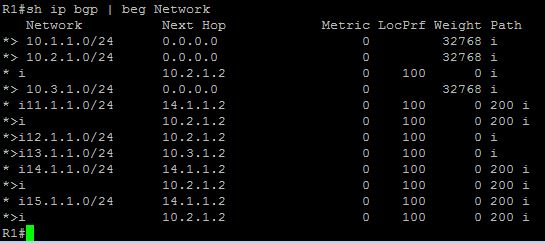
Notice that we have added the line "neighbor 10.2.1.1 next-hop-self", and now the routing table of R1 looks like this:


BGP next hop self

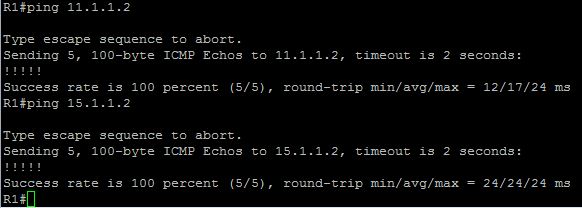
You can see that the preferred route (marked "*>") for the 11 and 15 networks now pass through the interface on R2 that is closest to R1. A ping confirms that its working.


bgp ping

Similar changes were then made on R3 for network 14.1.1.0/24. It is interesting though that after making the changes to R3, that R1 prefers the router to 14.1.1.1 through R2


bgp sub-optimal routing

This is clearly sub-optimal, but we'll save how to fix this in part 3 of this series.

BGP Peer-groups

Say we have a number of BGP peers that have identical settings, we can set up a peer-group for simplicity. the bonus here is that updates to a peer-group get sent simultaneously, rather than individually.

Keeping with our current set up we can move R2 and R3 into a peer-group on R1. so on R1 we configure the following:


BGP peer-groups

Then using the "no neighbor <ip address> remote-as 100" command we remove the two neighbors (R2 and R3).

We can then add them back, this time assigning them to the peer group "PeerGroup1"


BGP peer group

This is very useful if you have a large number of peers with identical settings. Note that you cant mix and match iBGP and eBGP peers in a peer-group. But you can have one peer-group for internal, and one for external peers. 

BGP confederations

The final topic in this post is BGP confederations. Confederations are another method (similar to route-reflectors) that alleviate the necessity for fully-meshed routers within an iBGP environment.

Confederations are really an AS within an AS, and are often referred to as sub-AS's.


BGP confederations
In the above example we have R1 in AS 100, R2 in AS 200 and R3 in AS 500. Both R1 and R2 are members of AS 300.

The configuration is not very complex. R2 would look like this:

R2(config)# router bgp 200
R2(config-router)# bgp confederation identifier 400
R2(config-router)# bgp confederation peer 100
R2(config-router)# neighbor 10.1.1.1 remote-as 100
R2(config-router)# neighbor 12.1.1.2 remote-as 500

On R3 we would set the config as follows:

R3(config)# router bgp 500
R3(config-router)# neighbor 12.1.1.1 remote-as 400

So R3 will peer with the parent-as (the confederation identifier) and not with the sub-AS of 200.

So that wraps up part 2. Next in part 3 we will look at BGP attributes, summarization, dampening and backdoors.

BGP - Part 3: BGP and the attributes of summarizing damp backdoors

In this final part of our BGP trilogy we are going to pick up on something from part two, and look at serval ways of resolving it, as well as looking at summarization, dampening and backdoors

Let's have a quick recap.


We have one router (R1) acting as a route reflector client for R2 and R3, within AS 100. R2 and R3 connect to R4 and R5 in AS 200. Now everything is working fine, but R1 is preferring the route to R3's AS 200 interface through R2, R4 and R5.


That's hardly the best route now really, is it? But with a little tweaking of BGP attributes we should be able to modify the routes used by R1 around the network. The other alternative is to reboot R2 unti we get the preferred route in the the routing table, but let's face it, this isn't really the way we would be able to do it in a production environment.

BGP attributes

BGP uses a number of attributes in the way it determines the best path to a destination, and within these attributes are sub categories, namely well-known and optional.
  • Well-known mandatory - supported by all BGP implementations, and are always included in every BGP update.
  • Well-known discretionary - supported by all BGP implementations, but are optionally included in BGP updates.
  • Optional Transitive - May not be supported by all implementations of BGP. Transitive means that a non-compliant BGP router will forward the unsupported attribute unchanged, when sending updates to peers
  • Optional Non-Transitive - As above, but the router will strip out the unsupported attribute when sending updates to peers.
So we have types of attribute covered, lets look at what we can actually tweak...

  • AS-Path (Code 2, well-known, mandatory) - The path of traversed AS's to reach a destination
  • Next-hop (Code 3, well-known, mandatory) - next-hop ip address to reach a destination
  • Origin (Code 1, well-known, mandatory) - Identifies the originator of the route
  • Local Preference (Code 5, well-known, discretionary) - provides a preference to determine a path for outbound traffic
  • Atomic Aggregate (Code 6, well-known, discretionary) - identifies routes that have been summarized
  • Aggregator (Code 7, optional transitive) - Identifies the BGP router that performed address summarization
  • Community (Code 8, optional transitive) - tags routes that share common characteristics into a community
  • Muti-Exit-Descriminator (MED) (Code 4, optional non-transitiive) - provides a preference to eBGP peers for a specific inbound router
  • Weight (Cisco Proprietary) - similar to local preference, provides a local weight to determine the best path for outbound traffic

Best Path determination

We know what attributes can be sent within a BGP update, but the list above does not follow the order in which two routes to the same destination are actually compared:

  • Weight - applied to inbound routes to influence the best outbound path, highest wins
  • Local preference - applied to inbound routes to influence the best outbound path, highest local preference wins
  • Locally Originated - is the next hop 0.0.0.0?
  • AS-Path - applied to outbound routes to influence the best inbound path, which route has the shortest AS-Path, this is between AS's
  • Origin Code - IGP, EGP or ? (unknown)
  • MED - applied to outbound routes to influence the best inbound path, lowest wins
  • BGP Router type - eBGP or iBGP? eBGP wins
  • Age - oldest preferred
  • BGP Router-ID lowest sending router id wins.
What should we use where? Well, lets think about this in terms of a lab task. We could have a couple of different tasks that would control where we are making the changes. Let's have a look at a couple of different tasks:

1. R1 must prefer the route to 14.1.1.1 through R3 with R2 acting as a backup route. You are not alloed to make any changes on R2 or R3
2. R1 must prefer the route to 14.1.1.1 through R3 with R2 acting as a backup route. You are not allowed to make any changes on R1 or R2
3. R1 must prefer the route to 14.1.1.1 through R3 with R2 acting as a backup route. You are not allowed to make any changes on R1 or R3

So here we can see that in task 1 we are allowed to make changes on R1, in task 2 we can only change R3, and in task 3 we can only change R2.

So following these we can start to see what we can change, and where:

Task 1 - Weight, local preference 
Task 2 - MED
Task 3 - BGP Router-ID

Influencing BGP paths using the Weight attribute

With weight the highest number wins. By default the weight advertised in a BGP route from another router will be 0. Weight can be any number between 0 and 65535.

As we can see from the below screen shot, we are just using the defaults for our topology at the moment:


On R1 we can either use the weight command in conjunction with the neighbor command to influence all routes (here we would use "neighbor 13.1.1.1 weight 200"), but we only want to affect the 14.1.1.0/24 network, and we can do this through an access-list (or an ip prefix-list) and a route-map:


We start with an access list, reference this in the route-map and then assign route-map to neighbor for R3:


Lastly we need to clear the BGP process using the "clear ip bgp 100" command.

Then we can take another look at our bgp table and see that now that route is favoured due to the higher weight:

And the router's routing table confirms this:


Influencing BGP paths using the local pref attribute

If we reset R1 and keep our fingers crossed, then thankfully it comes up as it was before, preferring the path through R2 to reach R3's far end.


Now we can tune the local preference. which can range from 0 to 4294967295 (it's a 32 bit number). The default, as we can see from the pictures above, is 100. The highest local preference is preferred.

Let's create an ip prefix-list this time to go along with our route-map:


And we implement it in our BGP configuration in the same manner as before:


Lastly we need to reload BGP using the clear ip bgp command again, and we can see that the new route has taken effect:


And if we check out the bgp tables:


We can see that the local pref now shows 200 instead of 100.

Influencing BGP paths using the MED attribute

With MED a lower value is preferred, so we could increase the MED on R2

And the effect? It looks good:


Influencing BGP paths using the BGP Router-ID

We have seen that we can control how a route is perceived as it comes into a router, and so far how to reduce it's preference as it leaves a router, but if we wanted to change how R3 is selected in R1's path choices, well, not much is actually left for us to change.

But we do have the router-id still, so lets change that and see what happens;

Firstly we change the router-id on R3:


Notice that changing the router-id drops all the BGP adjacencies, and we must wait for about a minute for it to rebuild all the adjacencies, but once everything is back up and running we can see on R1:


That the path on R1 to 14.1.1.1 will be through R3 and not through R2, but annoyingly, so is everything else. We could combine some of the methods we have used earlier and make R3 less preferred for some of the other routes. 

BGP Summarization

BGP summarizes redistributed routes by default. As with other routing protocols we can disable this by using the "no auto-summary" command.

We can create a summary address for 10.1.0.0/24 10.1.1.0/24, 10.1.2.0/24 and 10.1.3.0/24 by using the aggregate-address command:

aggregate-address 10.1.0.0 255.255.252.0

The default for BGP is to send both the aggregate address as well as the specific routes, we can modify this behaviour by adding the summary-only statement:

aggregate-address 10.1.0.0 255.255.252.0 summary-only 

We can also choose to summarize specific routes (known as suppressing):

access-list 5 permit 10.1.2.0 0.0.0.255
access-list 5 permit 10.1.3.0 0.0.0.255

route-map SUPPRESSION permit 10
match ip address 5

router bgp 100
aggregate-address 10.1.0.0 255.255.252.0 summary-only suppress-map SUPRESSION

Lastly we can allow the summarized routes to retain their AS-Path informations by appending as-set:

aggregate-address 10.1.0.0 255.255.252.0 summary-only suppress-map SUPRESSION as-set

BGP Dampening

Route dampening suppresses flapping routes. When a route flaps it is assigned a penalty, and upon reaching a penalty threshold the route is supressed, until the line stabilizes, the penalties decrease and the line is deemed usable again.

Dampening can be tweaked as follows:

ip prefix-list DAMPLIST seq 10 permit 10.1.2.0/24
ip prefix-list DAMPLIST seq 20 permit 10.1.3.0/24

route-map DAMPMAP permit 10
match ip address prefix-list DAMPLIST
set dampening 15 750 2000 60

router bgp 100
bgp dampening route-map DAMPMAP

We have a number of figures for dampening:

15 (minutes) - half-life timer, if a penalty has been assigned to a route then half the penalty will decay after this timer expires
750 (penalty measurement) - bottom threshold, once a penalized route falls below this threshold with will no longer be suppressed.
2000 (penalty measurement) - top threshold - if a flapping route's penalties exceed this threshold then it will be suppressed
60 (minutes) maximum amount of time a route can be suppressed.

BGP Backdoors

If an IGP route and an eBGP route exist for the same network then we can find that we have sub-optimal routing where the eBGP route is preferred. We can change this in one of two ways, by changing BGPs default AD, or using the network backdoor command.

Changing default AD values is not recommended, so we can use option B.

Using the network backdoor command adjusts the AD for a specific eBGP route from 20 to 200, forcong rhe IGP route to be preferred:

router bgp 100
network 10.1.5.0 mask 255.255.255.0 backdoor

Wrap-up

And there we are for BGP.

We have covered the basics, reflection, confederation, peer groups, changing attributes to tune routing, summarization, supression, and backdoors.  I hope you have found it useful.