Andrea, the guy behind the great IOU-WEB, has released Unetlab (Unified Networking Lab). It's still in beta at the moment, but I thought I would have a look.
Even though I have not finished my CCIE R&S yet, I am looking towards the Service Provider CCIE, which I plan to do straight after the R&S. With the SP track (as it stands at the moment), you need to get your hands on the XRv. This will run, happily, on ESXi, and can be connected to IOU, or even into GNS3 (using VirtualBox). I had started to play around with this, but it's not exactly the easiest thing in the world. So I was very pleased when Unetlab came out, as everything can be within one environment.
So I decided to get my hands dirty and have a go.
I am using an ESXi server, with 32GB ram, but it'll run in VMWare player, workstation, Fusion, and VirtualBox as well.
Once I had downloaded it (its about 300Mb give or take), and imported it into ESXi, I followed the
Unetlab install guide. It's a simple process, and you are guided through it. It's well worth doing an update as well to get the home page displayed below.
The interface is sparse (at the moment, remember this is a beta), but has everything that I need at the moment.
My first step was to import the IOU images. The caveat here is that you need to generate the IOU license, I won't go into details, but it's easy to google how to do this. The only gotcha I came across was that the images must have a .bin extension - so make sure that you add this first.
Following the install doc I copied the files, using FileZilla, to /opt/unetlab/addons/iol/bin, and fixed the permissions using the command "/opt/unetlab/wrappers/unl_wrapper -a fixpermissions". Then I went back into the gui and created my first lab.
From the Actions menu, I create a new lab, and call it IOL test
From the Actions menu, I then create a network:
Then I add a Node, also from the Actions menu:
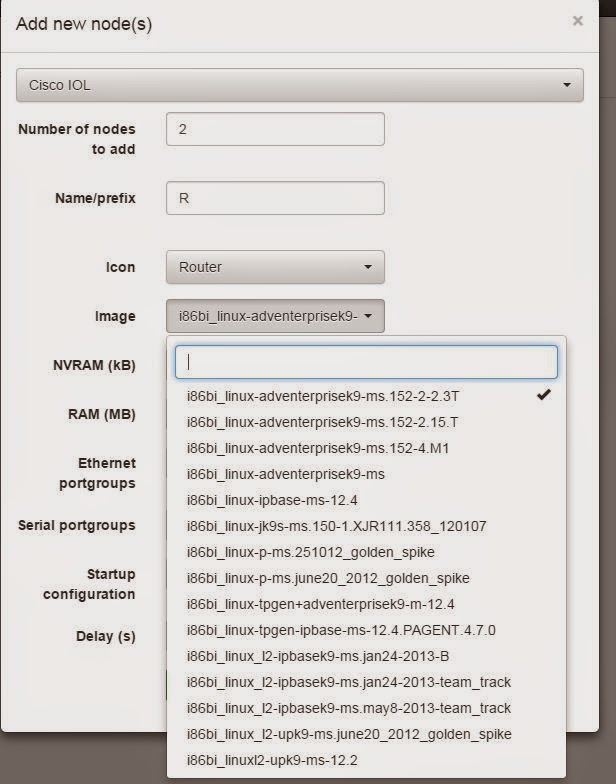
I add 2 nodes, and from the drop down select an IOL image (that I have already uploaded through FileZilla):
My two nodes appear on the screen:
I then right click on a node, and select "Interfaces", and point R1 to use the network I just created:
My first node is added to the network
I then repeat on R2, and my two nodes are connected:
From the Actions menu I then select "Open this Lab", and now I can start my two routers:
If you havn't followed the guide on the website, then you will find that the nodes do not start, so please do follow the guides to the letter.
Give them a few minutes to fire up, assign an IP address, and all works well:
So far memory usage is pretty good (remember that this is on a 4GB VirtualBox VM):
Let's add the XRv image.
This is slightly more complex, but again the documentation for
importing XRv into Unetlab explains every step.
Now I can add multiple XRv routers, and connect them to the IOU images.
I am going to edit my original lab, so we need to go to the Actions menu, and select "Edit this lab":
I then add the XRv router:
Connect to interfaces to our network
Once we add the network to the new router, and also set another interface on both of the IOL routers, we get something like this:
Going back to the Actions menu, select Open this lab, and start the router. Here I did see an error, but after a few attempts, it did start:
Memory usage has now pretty much hit the ceiling, as the XRv takes quite a chunk (3GB), but nonetheless, it serves to prove that the system works. Adding more memory is clearly required here if you want to run a decent sized topology with a range of devices.
It takes a long time for the XRv to fire up, again this is down to the memory I have available, it worked much better on my ESXi server, but it does work:
It's a little untidy at the moment, so let's do a bit of reconfiguration:
We'll add a new network, and set the XRv to use this, as well as moving the E0/1 interface of both the IOL routers to use this:
Now the topology looks much cleaner!
Still, let's clean it up even more, and add another network, and reconfigure it a bit:
Much cleaner!
CDP looks a bit funky, and pings don't work, but then I think I just need to play around with it a bit. It's only my first real go at playing with this, so there are bound to be teething troubles!
With this in mind, I shut everything down, and fired them all up again. Now things look much better:
RP/0/0/CPU0:XRv-1(config)#interface Gi0/0/0/0
RP/0/0/CPU0:XRv-1(config-if)#ipv4 address 10.1.1.1 255.255.255.0
RP/0/0/CPU0:XRv-1(config-if)#cdp
RP/0/0/CPU0:XRv-1(config-if)#no shut
RP/0/0/CPU0:XRv-1(config-if)#int gi 0/0/0/1
RP/0/0/CPU0:XRv-1(config-if)#ipv4 address 10.1.2.1 255.255.255.0
RP/0/0/CPU0:XRv-1(config-if)#cdp
RP/0/0/CPU0:XRv-1(config-if)#no shut
RP/0/0/CPU0:XRv-1(config-if)#exit
RP/0/0/CPU0:XRv-1(config)#cdp
RP/0/0/CPU0:XRv-1(config)#commit
RP/0/0/CPU0:XRv-1(config)#exit
RP/0/0/CPU0:XRv-1#sh ip int bri
Wed Feb 18 13:18:20.485 UTC

Interface                      IP-Address      Status         Protocol
MgmtEth0/0/CPU0/0              unassigned      Shutdown       Down
GigabitEthernet0/0/0/0         10.1.1.1        Up             Up
GigabitEthernet0/0/0/1         10.1.2.1        Up             Up
GigabitEthernet0/0/0/2         unassigned      Shutdown       Down
RP/0/0/CPU0:XRv-1#ping 10.1.1.2
Wed Feb 18 13:18:26.475 UTC
Type escape sequence to abort.
Sending 5, 100-byte ICMP Echos to 10.1.1.2, timeout is 2 seconds:
!!!!!
Success rate is 100 percent (5/5), round-trip min/avg/max = 1/61/279 ms
RP/0/0/CPU0:XRv-1#ping 10.1.2.2
Wed Feb 18 13:18:32.994 UTC
Type escape sequence to abort.
Sending 5, 100-byte ICMP Echos to 10.1.2.2, timeout is 2 seconds:
!!!!!
Success rate is 100 percent (5/5), round-trip min/avg/max = 1/9/29 ms
RP/0/0/CPU0:XRv-1#sh cdp neigh
Wed Feb 18 13:22:11.959 UTC
Capability Codes: R - Router, T - Trans Bridge, B - Source Route Bridge
                  S - Switch, H - Host, I - IGMP, r - Repeater

Device ID       Local Intrfce    Holdtme Capability Platform  Port ID
R1              Gi0/0/0/0        163     R          Linux Uni Et0/1
R2              Gi0/0/0/1        138     R          Linux Uni Et0/1
RP/0/0/CPU0:XRv-1#


R2#sh ip int bri | e unas
Interface                  IP-Address      OK? Method Status  Protocol
Ethernet0/0                192.168.1.2     YES NVRAM  up      up
Ethernet0/1                10.1.2.2        YES NVRAM  up      up

R2#ping 10.1.2.1
Type escape sequence to abort.
Sending 5, 100-byte ICMP Echos to 10.1.2.1, timeout is 2 seconds:
!!!!!
Success rate is 100 percent (5/5), round-trip min/avg/max = 4/7/14 ms
R2#ping 192.168.1.1
Type escape sequence to abort.
Sending 5, 100-byte ICMP Echos to 192.168.1.1, timeout is 2 seconds:
!!!!!
Success rate is 100 percent (5/5), round-trip min/avg/max = 1/1/2 ms
R2#

R1#sh ip int bri | e unas
Interface                  IP-Address      OK? Method Status  Protocol
Ethernet0/0                192.168.1.1     YES NVRAM  up      up
Ethernet0/1                10.1.1.2        YES NVRAM  up      up

R1#ping 192.168.1.2
Type escape sequence to abort.
Sending 5, 100-byte ICMP Echos to 192.168.1.2, timeout is 2 seconds:
!!!!!
Success rate is 100 percent (5/5), round-trip min/avg/max = 1/3/6 ms
R1#ping 10.1.1.1
Type escape sequence to abort.
Sending 5, 100-byte ICMP Echos to 10.1.1.1, timeout is 2 seconds:
!!!!!
Success rate is 100 percent (5/5), round-trip min/avg/max = 7/8/10 ms
R1#
There we have it, two IOL routers, one XRv router, all communicating happily, all contained within one environment.
Where Unetlab is superb, is that everything is within the same environment. There is no mucking about with creating multiple networks in VMWare. To be honest, some will probably find that easy, but I like to have it all contained, like Unetlab does.
Running two XRv routers did cause the default memory to top out, so I shut down the VM, and increased the memory to 20GB. Now I can run loads of routers, and the memory usage (as reported on the "Home" page remains within reasonable levels. Please note though that I am showing screenshots from a VirtualBox install, with a lower amount of memory.
So what's next?
The vendor support in Unetlab is very wide-ranging. I havn't tried all of them, but will add some dynamips images, CSR1000v and the vIOS images this week.
At the moment the supported images are:
- Aruba ClearPass
- Alcatel 7750 SR
- Arista vEOS
- CheckPoint Security Gateway VE
- Cisco ASA (porting)
- Cisco ASAv
- Cisco CSR 1000V
- Cisco IPS (porting)
- Cisco IOS 1710 (dynamips, ethernet only)
- Cisco IOS 3725 (dynamips, ethernet only)
- Cisco IOS 7206VXR (dynamips, ethernet only)
- Cisco IOL (for Cisco internal use only)
- Cisco Titanium (for VIRL customers only)
- Cisco vIOS (for VIRL customers only)
- Cisco vIOS L2 (for VIRL customers only)
- Cisco XRv
- F5 BIG-IP LTM VE
- Fortinet FortiGate (new)
- HP VSR1000
- Juniper Olive (porting)
- Juniper vSRX
- Palo Alto VM-100 Firewall
- VyOS
The scope of Unetlab is immense. Clearly this will work well for when I do the SP track, as the IOL and XRv images are supported, and work nicely.
This also gives scope for the Security track as well. It will "natively" run the ASAs and the IPS, and you can connect clouds to run things like an Active Directory server, WSA (Web Security Appliance), ACS (Access Control Server), WLC (Wireless Lan Controller), ISE, and all the rest (there is a LOT of components in the Security track). I would probably need to invest in a second ESXi server in order to run all of the above, but then for the sum of £200, it's a worthwhile investment.
Unetlab is superb, already, and it is still very early days. While the interface can be a little slow to update (such as moving objects around, but then this is less of a concern than the amazing functionality that it offers), Andrea has excelled himself again, he deserves a big thanks for all his hard work and dedication to the community. It's just a shame that he hasn't done a kickstarter, like GNS3 did as I am sure that people would support him. I'd certainly give him some money!