Showing posts with label IKEv1. Show all posts

A CCIE Security engineer walks into a bar, things get weird

This might get a bit weird, and you can blame me for watching too much of The Might Boosh, but bear with it.

Picture the scene.

You walk into a bar, with a friend who you refer to as "silly knickers".

At the first table, you point to your friend, and can see a pissed-up architect, trying to draw whilst wearing cashmere mittens. What an idiot.

You look at the second table, and point to your friend again, as there are two pissed-up architects, both trying to draw whilst wearing cashmere mittens. Idiots,

Getting a drink is Easy. You politely point at the bar and grab an alcoholic apple juice. Then you head to the bathroom and pee in private. You fancy a vanilla tequila.

Back at the bar, the barman is also a fitness instructor. He's flexing happily. Two authors walk in, they politely propose a policy of only drinking alcoholic apple juice, in order to keep bar profits set high. You prefer a vanilla tequila.

One of the authors is actually a client of the barman, so he does not point and laugh. Instead, he says he'd like the same, but instead of vanilla tequila, he'd like a cup of tea in two cups.

The authors get served.

The next to get served is a policeman with a key. He's carrying Optimus Prime under one arm, and Bumblebee under the other. He has another key, which is huge, it's a really strong key. He orders a cucumber and a lemonade and nods to the group.

As is a bar policy, anyone with a key gets to make the rules. Before you know it, everyone is wearing cashmere mittens. Idiots!

Ok, story time over. All good stories have meanings, so what's this one all about (if you haven't worked it out from the clues)? I am sure lots of readers are thinking.. WTF?


Well, this is to try and remember VPN setups.

I made the VPNs cheatsheet a week or two ago, and this is good for showing where things fit in with each other, but I was still forgetting the steps.

I tried mnemonics, but they just came out as unrelated words, so decided to turn it into a story, with enough information to remember all the steps.

Let's break it down.

The first table is IKEv1.

I = ISAMKP
Point = Policy
To = Transform
Silly = Set
Knickers = Keyring
If = ISAMKP
Pissed = Profile
Architect = ACL
Cashmere = Crypto
Mittens = MAP
Idiot = Interface

Table 2 is IKEv2

I = ISAMKP
Point = Policy
To = Transform
Silly = Set
Knickers = Keyring
If = ISAMKP
2
Pissed = Profile
Architect = ACL
Cashmere = Crypto
Mittens = MAP
Idiots = Interface

A little harder, but the 2 signifies IKEv2 commands, and we need four of them (proposal, policy, keyring and profile). Each starts with "crypto ikev2", so we can use the context-sensitive help.

Easy VPN is next (its EASY to get served...)

I = ISAKMP
Politely = Policy
Point = Pool
Grab = Group
An Alcoholic Apple (juice) = AAA 
I = ISAKMP
Pee = Profile
In = IPSec 
Private = Profile
Vanilla = Virtual
Tequila = Template

I have left the client-side out, as that's pretty easy (create the "crypto ipsec client ez group", and assign the outside and inside interfaces)

Then comes FlexVPN Server (our flexing barman)

Point = Pool
And = Access
Laugh = List
2 Authors = IKEv2 Authorization
Politely = Policy
Propose = Proposal
Policy = Policy
Alcoholic Apple = AAA
2 Keep = Ikev2 Keyring
Profiles = IKEv2 Profile
Set = Transform Set
I = IPSec 
Prefer = Profile
Vanilla = Virtual
Tequila = Template

A server is no good without a client And this is much the same. Here the author wants the same as the server, without the pointing and laughing, but he does not want the vanilla tequila (virtual template), and orders:

Tea = Tunnel
In = Interface
2 = IKEv2
Cups = Client

The policeman is getting served next, which brings us onto GETVPN.

Is A = ISAMKP
Policeman = Policy
Key = ISAKMP key
Transformers = Transform Set
Really Strong Key = RSA key
A Cucumber and Lemonade = ACL
(nods to the) Group = GDOI Group

I have left out the IPSec profile from the server. I could not think of anything to fit, and the IOS will actually complain (I think) if this is missing, so it should be easy to figure out the missing bit(s).

Finally, we have the GETVPN client:

(As) Is A = ISAKMP
(bar) policy = Policy
Key = ISAKMP Key
Group = GDOI group
Cashmere = Crypto
Mittens = Map
Idiots = Interface

Trying to keep things like crypto map (cashmere mittens), interface (idiot/s) and virtual template (vanilla tequila) the same across the story, as it makes it (slightly) easier to remember. It's a weird story, but with enough repetition, and picturing yourself in the bar, it should aid memory.
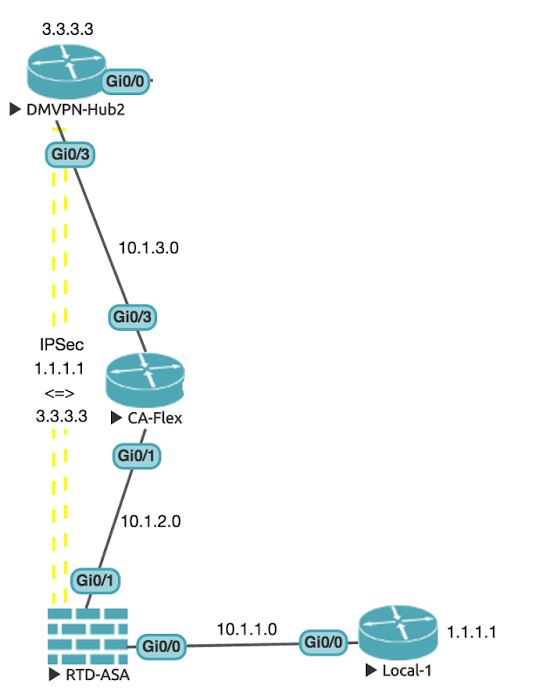
CCIE Security Lab: ASA to IOS IKEv1 tunnel

In the first part of the new VPN topology, I will be looking at connecting up the lower left-hand side routers, using a mix of static routes and OSPF to get them talking, and then setting up an IPSec VPN between the ASA and DMVPN-Hub2.

Cisco ASA to IOS IPSec VPNs

We will start with the basic connectivity. Using static routing to send all of Local-1's traffic to the ASA, and then OSPF to bridge the rest of the network.

You can find most of the steps in the link for ASA to IOS IKEv1.

Basic OSPF

The OSPf setup here is nothing special, everything is going into Area 0:
RTD-ASA# sh int ip bri | e unas
Interface                  IP-Address      OK? Method Status                Protocol
GigabitEthernet0/0         10.1.1.254      YES manual up                    up  
GigabitEthernet0/1         10.1.2.254      YES manual up                    up  
RTD-ASA#

Local-1#sh ip int bri | e unas
Interface                  IP-Address      OK? Method Status                Protocol
GigabitEthernet0/0         10.1.1.1        YES manual up                    up      
Loopback0                  1.1.1.1         YES manual up                    up      
Local-1#

Local-1(config)#ip route 0.0.0.0 0.0.0.0 10.1.1.254
Local-1(config)#


RTD-ASA(config)# route inside 1.1.1.1 255.255.255.255 10.1.1.1
RTD-ASA(config)#
RTD-ASA(config)# router ospf 1
RTD-ASA(config-router)# network 10.1.2.0 255.255.255.0 area 0
RTD-ASA(config-router)# red static subnets
RTD-ASA(config-router)# 

CA-Flex(config)#do sh ip int bri | e unas
Interface                  IP-Address      OK? Method Status                Protocol
GigabitEthernet0/1         10.1.2.2        YES manual up                    up      
GigabitEthernet0/3         10.1.3.2        YES manual up                    up      
Loopback0                  2.2.2.2         YES manual up                    up      

CA-Flex(config)#router ospf 1
CA-Flex(config-router)#router-id 2.2.2.2
CA-Flex(config-router)#network 10.1.2.0 0.255.255.255 area 0
CA-Flex(config-router)#                              
CA-Flex(config-router)#network 10.1.3.0 0.255.255.255 area 0
CA-Flex(config-router)#

DMVPN-Hub2(config)#do sh ip int bri | e unas
Interface                  IP-Address      OK? Method Status                Protocol
GigabitEthernet0/0         10.1.5.3        YES manual up                    up      
GigabitEthernet0/3         10.1.3.3        YES manual up                    up      
Loopback0                  3.3.3.3         YES manual up                    up      

DMVPN-Hub2(config)#router ospf 1
DMVPN-Hub2(config-router)#router-id 3.3.3.3
DMVPN-Hub2(config-router)#network 10.1.3.0 0.255.255.255 area 0
DMVPN-Hub2(config-router)#
%OSPF-5-ADJCHG: Process 1, Nbr 2.2.2.2 on GigabitEthernet0/3 from LOADING to FULL, Loading Done
DMVPN-Hub2(config-router)#
Now that we have this done, we can set up the VPN tunnel.

IKEv1 IPSec tunnel between ASA and IOS

Now we set up the VPN tunnel. It won't work straight away, and this is (partially) intentional. I need to be hot on the debugging of VPN failures for the exam, that said, I don't want to spend too much time troubleshooting in the lab!

The first step is to create the access lists to define our interesting traffic:
RTD-ASA(config)# access-list IPSec-VPN-Traffic extended permit ip host 1.1.1.1 host 3.3.3.3

DMVPN-Hub2(config)#access-list 101 permit ip host 3.3.3.3 host 1.1.1.1
DMVPN-Hub2(config)#
We then create the ISAKMP policy:
RTD-ASA(config)# crypto isakmp policy 10
RTD-ASA(config-ikev1-policy)# encryption 3des
RTD-ASA(config-ikev1-policy)# auth pre-share 
RTD-ASA(config-ikev1-policy)# group 2
RTD-ASA(config-ikev1-policy)# 

DMVPN-Hub2(config)#crypto isakmp policy 10
DMVPN-Hub2(config-isakmp)#encr 3des
DMVPN-Hub2(config-isakmp)#auth pre-share 
DMVPN-Hub2(config-isakmp)#group 2
DMVPN-Hub2(config-isakmp)#
Next we create the transform set
RTD-ASA(config)# crypto ipsec transform-set VPN-transforms esp-3des esp-sha-hmac
RTD-ASA(config)# 

DMVPN-Hub2(config)#crypto ipsec transform-set VPN-transforms esp-3des esp-sha-hmac     
DMVPN-Hub2(cfg-crypto-trans)#exit
DMVPN-Hub2(config)#
Then we create the crypto maps (defining our peers, and utilizing the transform set created earlier):
RTD-ASA(config)# crypto map VPN_Map 1 set peer 10.1.3.3
RTD-ASA(config)# crypto map VPN_Map 1 set ikev1 transform-set VPN-transforms
RTD-ASA(config)# crypto map VPN_Map 1 set ikev2 pre-shared-key cisco
RTD-ASA(config)# crypto map VPN_Map 1 match address IPSec-VPN-Traffic
RTD-ASA(config)# 
RTD-ASA(config)# crypto map VPN_Map interface Outside
RTD-ASA(config)# 
RTD-ASA(config)# tunnel-group 10.1.3.3 type ipsec-l2l 
RTD-ASA(config)# tunnel-group 10.1.3.3 ipsec-attributes 
RTD-ASA(config-tunnel-ipsec)# ikev1 pre-shared-key cisco
RTD-ASA(config-tunnel-ipsec)# 

DMVPN-Hub2(config)#crypto keyring VPN_Keys
DMVPN-Hub2(conf-keyring)#pre-shared-key address 10.1.2.254 key cisco
DMVPN-Hub2(conf-keyring)#exit
DMVPN-Hub2(config)#
DMVPN-Hub2(config)#crypto isakmp profile VPN_Map 
% A profile is deemed incomplete until it has match identity statements
DMVPN-Hub2(conf-isa-prof)#match identity address 10.1.2.254 255.255.255.255
DMVPN-Hub2(conf-isa-prof)#keyring VPN_Keys
DMVPN-Hub2(conf-isa-prof)#exit
DMVPN-Hub2(config)#
DMVPN-Hub2(config)#crypto map VPN_Map 1 ipsec-isakmp
% NOTE: This new crypto map will remain disabled until a peer
        and a valid access list have been configured.
DMVPN-Hub2(config-crypto-map)#set peer 10.1.2.254
DMVPN-Hub2(config-crypto-map)#set transform-set VPN-transforms
DMVPN-Hub2(config-crypto-map)#set isakmp-profile VPN_Map
DMVPN-Hub2(config-crypto-map)#match address 101
DMVPN-Hub2(config-crypto-map)#int gi 0/3
DMVPN-Hub2(config-if)#crypto map VPN_Map
DMVPN-Hub2(config-if)#
*Jun 26 07:59:10.158: %CRYPTO-6-ISAKMP_ON_OFF: ISAKMP is ON
DMVPN-Hub2(config-if)#
As it stands, we can bring up the tunnel by pinging 1.1.1.1 from DMVPN-Hub2 by setting the source as lo0:
DMVPN-Hub2#ping 1.1.1.1 so lo0
Type escape sequence to abort.
Sending 5, 100-byte ICMP Echos to 1.1.1.1, timeout is 2 seconds:
Packet sent with a source address of 3.3.3.3 
.....
Success rate is 0 percent (0/5)
DMVPN-Hub2#

RTD-ASA# sh crypto isakmp sa

IKEv1 SAs:

   Active SA: 1
    Rekey SA: 0 (A tunnel will report 1 Active and 1 Rekey SA during rekey)
Total IKE SA: 1

1   IKE Peer: 10.1.3.3
    Type    : L2L             Role    : responder 
    Rekey   : no              State   : MM_ACTIVE 

There are no IKEv2 SAs
RTD-ASA# 

DMVPN-Hub2#sh crypto isakmp sa
IPv4 Crypto ISAKMP SA
dst             src             state          conn-id status
10.1.2.254      10.1.3.3        QM_IDLE           1001 ACTIVE

IPv6 Crypto ISAKMP SA

DMVPN-Hub2#
We have the right details above. The ASA should show MM_ACTIVE, and the IOS route should show "QM_IDLE". We will not get a response yet as RTD-ASA is not set up yet. We still need to set up NAT, and a NAT exemption for the 1.1.1.1 address.

We do want to NAT the 10.1.1.1 subnet, but not the 1.1.1.1 subnet, so let's set that up as well.

We start by creating three objects, one for the network we will want to NAT (10.1.1.0/24), one for the host we do not want to NAT for internally (1.1.1.1) and one for the host we will not want to NAT for externally (3.3.3.3):
RTD-ASA(config)# object network Nat-Networks
RTD-ASA(config-network-object)# subnet 10.1.1.0 255.255.255.0
RTD-ASA(config-network-object)# exit
RTD-ASA(config)# object network No-Nat-Networks
RTD-ASA(config-network-object)# host 1.1.1.1
RTD-ASA(config-network-object)# exit
RTD-ASA(config)# object network No-Nat-Destination
RTD-ASA(config-network-object)# host 3.3.3.3
RTD-ASA(config-network-object)# exit
The we can use these objects in the NAT rule:
RTD-ASA(config)# terminal width 255
RTD-ASA(config)# nat (inside,outside) source static No-Nat-Networks No-Nat-Networks destination static No-Nat-Destination No-Nat-Destination no-proxy-arp route-lookup
RTD-ASA(config)# 
Does it work now?
Local-1#ping 3.3.3.3 so lo0
Type escape sequence to abort.
Sending 5, 100-byte ICMP Echos to 3.3.3.3, timeout is 2 seconds:
Packet sent with a source address of 1.1.1.1 
.....
Success rate is 0 percent (0/5)
Local-1#
Not so far. Let's dig in:
RTD-ASA# sh crypto ipsec sa
interface: Outside
    Crypto map tag: VPN_Map, seq num: 1, local addr: 10.1.2.254

      access-list IPSec-VPN-Traffic extended permit ip host 1.1.1.1 host 3.3.3.3 
      local ident (addr/mask/prot/port): (1.1.1.1/255.255.255.255/0/0)
      remote ident (addr/mask/prot/port): (3.3.3.3/255.255.255.255/0/0)
      current_peer: 10.1.3.3


      #pkts encaps: 0, #pkts encrypt: 0, #pkts digest: 0 <== Nothing being transmitted!
      #pkts decaps: 14, #pkts decrypt: 14, #pkts verify: 14
      #pkts compressed: 0, #pkts decompressed: 0
      #pkts not compressed: 0, #pkts comp failed: 0, #pkts decomp failed: 0
      #pre-frag successes: 0, #pre-frag failures: 0, #fragments created: 0
      #PMTUs sent: 0, #PMTUs rcvd: 0, #decapsulated frgs needing reassembly: 0
      #TFC rcvd: 0, #TFC sent: 0
      #Valid ICMP Errors rcvd: 0, #Invalid ICMP Errors rcvd: 0
      #send errors: 0, #recv errors: 0

      local crypto endpt.: 10.1.2.254/0, remote crypto endpt.: 10.1.3.3/0
      path mtu 1500, ipsec overhead 58(36), media mtu 1500
      PMTU time remaining (sec): 0, DF policy: copy-df
      ICMP error validation: disabled, TFC packets: disabled
      current outbound spi: 45623476
      current inbound spi : 26AD8AD7

    inbound esp sas:
      spi: 0x26AD8AD7 (648907479)
         transform: esp-3des esp-sha-hmac no compression 
         in use settings ={L2L, Tunnel, IKEv1, }
         slot: 0, conn_id: 8192, crypto-map: VPN_Map
         sa timing: remaining key lifetime (kB/sec): (3914998/2623)
         IV size: 8 bytes
         replay detection support: Y
         Anti replay bitmap: 
          0x00000000 0x00007FFF
    outbound esp sas:
      spi: 0x45623476 (1164063862)
         transform: esp-3des esp-sha-hmac no compression 
         in use settings ={L2L, Tunnel, IKEv1, }
         slot: 0, conn_id: 8192, crypto-map: VPN_Map
         sa timing: remaining key lifetime (kB/sec): (3915000/2622)
         IV size: 8 bytes
         replay detection support: Y
         Anti replay bitmap: 
          0x00000000 0x00000001

RTD-ASA#
We are not transmitting any packets. Why is this?
RTD-ASA(config)# logging console 7
RTD-ASA(config)# logging on
%ASA-5-111008: User 'enable_15' executed the 'logging on' command.
RTD-ASA(config)# 
%ASA-5-111010: User 'enable_15', running 'CLI' from IP 0.0.0.0, executed 'logging on'
%ASA-7-609001: Built local-host Outside:3.3.3.3
%ASA-7-609001: Built local-host Inside:1.1.1.1
%ASA-6-302020: Built inbound ICMP connection for faddr 3.3.3.3/4 gaddr 1.1.1.1/0 laddr 1.1.1.1/0
%ASA-6-110002: Failed to locate egress interface for ICMP from Inside:1.1.1.1/0 to 3.3.3.3/4
%ASA-6-302021: Teardown ICMP connection for faddr 3.3.3.3/4 gaddr 1.1.1.1/0 laddr 1.1.1.1/0
%ASA-7-609002: Teardown local-host Outside:3.3.3.3 duration 0:00:10
%ASA-7-609002: Teardown local-host Inside:1.1.1.1 duration 0:00:10
The clue here is "Failed to locate egress interface", meaning we do not have a route to the destination. Let's add one, and see if this solves the issue:
DMVPN-Hub2(config)#router ospf 1
DMVPN-Hub2(config-router)#network 3.3.3.3 0.0.0.0 area 1 
DMVPN-Hub2(config-router)#
Does it work now?
Local-1#ping 3.3.3.3 so lo0
Type escape sequence to abort.
Sending 5, 100-byte ICMP Echos to 3.3.3.3, timeout is 2 seconds:
Packet sent with a source address of 1.1.1.1 
.!!!!
Success rate is 80 percent (4/5), round-trip min/avg/max = 9/10/12 ms
Local-1#
It does. We are also encrypting as much traffic as we are decrypting:
RTD-ASA# sh vpn-sessiondb detail l2l 

Session Type: LAN-to-LAN Detailed

Connection   : 10.1.3.3
Index        : 3                      IP Addr      : 10.1.3.3
Protocol     : IKEv1 IPsec
Encryption   : IKEv1: (1)3DES  IPsec: (1)3DES
Hashing      : IKEv1: (1)SHA1  IPsec: (1)SHA1
Bytes Tx     : 400                    Bytes Rx     : 400
Login Time   : 21:51:24 UTC Mon Jun 27 2016
Duration     : 0h:01m:27s

IKEv1 Tunnels: 1
IPsec Tunnels: 1

IKEv1:
  Tunnel ID    : 3.1
  UDP Src Port : 500                    UDP Dst Port : 500
  IKE Neg Mode : Main                   Auth Mode    : preSharedKeys
  Encryption   : 3DES                   Hashing      : SHA1
  Rekey Int (T): 86400 Seconds          Rekey Left(T): 86313 Seconds
  D/H Group    : 2
  Filter Name  : 

IPsec:        
  Tunnel ID    : 3.2
  Local Addr   : 1.1.1.1/255.255.255.255/0/0
  Remote Addr  : 3.3.3.3/255.255.255.255/0/0
  Encryption   : 3DES                   Hashing      : SHA1                   
  Encapsulation: Tunnel                 
  Rekey Int (T): 3600 Seconds           Rekey Left(T): 3513 Seconds           
  Rekey Int (D): 4608000 K-Bytes        Rekey Left(D): 4608000 K-Bytes        
  Idle Time Out: 30 Minutes             Idle TO Left : 28 Minutes             
  Bytes Tx     : 400                    Bytes Rx     : 400                    
  Pkts Tx      : 4                      Pkts Rx      : 4                      
  
RTD-ASA#
Perfect! Logging everything on the console probably isn't the best idea, though. On a small-scale like this it's fine, but in a busy production environment, it would be easy to miss important information. In a lab exam, it's fine, just so long as you remember to remove the logging commands that were added. So, do we have a neater method?

Let's remove the route and find out
DMVPN-Hub2(config)#router ospf 1
DMVPN-Hub2(config-router)#no network 3.3.3.3 0.0.0.0 area 1
DMVPN-Hub2(config-router)#

RTD-ASA# sh route | b Gate
Gateway of last resort is not set

S        1.1.1.1 255.255.255.255 [1/0] via 10.1.1.1, Inside
C        10.1.1.0 255.255.255.0 is directly connected, Inside
L        10.1.1.254 255.255.255.255 is directly connected, Inside
C        10.1.2.0 255.255.255.0 is directly connected, Outside
L        10.1.2.254 255.255.255.255 is directly connected, Outside
O        10.1.3.0 255.255.255.0 [110/11] via 10.1.2.2, 1d14h, Outside
O        10.1.5.0 255.255.255.0 [110/12] via 10.1.2.2, 1d14h, Outside

RTD-ASA# 
Now, using the packet-tracer command, we can see the error:
RTD-ASA# packet-tracer input Inside icmp 1.1.1.1 8 0 3.3.3.3         

Phase: 1
Type: ACCESS-LIST
Subtype: 
Result: ALLOW
Config:
Implicit Rule
Additional Information:
MAC Access list

Result:
input-interface: Inside
input-status: up
input-line-status: up
Action: drop
Drop-reason: (no-route) No route to host

RTD-ASA# 
We can also append the "detailed" keyword to get more information, but in this case, we just get a more succint output:
RTD-ASA# packet-tracer input Inside icmp 1.1.1.1 8 0 3.3.3.3 detailed

Result:
input-interface: Inside
input-status: up
input-line-status: up
Action: drop
Drop-reason: (no-route) No route to host

RTD-ASA# 
So, we can use this command, instead of enabling logging. For the moment, though, we'll just add the route back, and get the connectivity back:
DMVPN-Hub2(config)#router ospf 1
DMVPN-Hub2(config-router)#network 3.3.3.3 0.0.0.0 area 1
DMVPN-Hub2(config-router)#

Local-1#ping 3.3.3.3 so lo0
Type escape sequence to abort.
Sending 5, 100-byte ICMP Echos to 3.3.3.3, timeout is 2 seconds:
Packet sent with a source address of 1.1.1.1 
.!!!!
Success rate is 80 percent (4/5), round-trip min/avg/max = 9/9/10 ms
Local-1#
Throughout this post, when we have looked at the output of "show crypto isakmp sa" we have been told that "There are no IKEv2 SAs". In the next post we will set up IKEv2.